Nostr Wallet Connect (NWC) is one of the most elegant solutions to a persistent problem in Bitcoin’s Lightning Network ecosystem: how to seamlessly integrate payments into applications without requiring users to trust each app with custody of their funds. Using Nostr’s relay infrastructure and public-key cryptography, NWC creates a bridge between your Lightning wallet and any compatible application, enabling instant payments with just a QR code or a connection string.
But this convenience comes with profound security implications that most users don’t fully understand. When you connect an app to your wallet via NWC, you’re potentially giving that app the ability to drain your funds with zero additional confirmation required. A compromised app, a malicious update, or even a simple misconfiguration can result in the complete loss of the Bitcoin balance you’ve allocated to that connection.
So before you go in and start using this plug-and-play solution, you have to get to grips with NWC’s security model. Learn how to implement proper safeguards and develop disciplined connection management practices isn’t optional—it’s the difference between convenient Lightning payments and watching your sats disappear to applications you thought you could trust.
So why am I telling you this? Well, let me tell you a little story.
A Saturday morning drain
I woke up on Saturday morning and logged into nostr as one waits for their coffee to kick in, and as I was about to zap, I noticed something strange: my wallet balance didn’t look the way I remembered.
Oh no! Here we go again, jumping into investigation mode, I quickly noticed two sent transactions and a few failed transactions, but how could that be?
I was sound asleep at the time of those transactions.
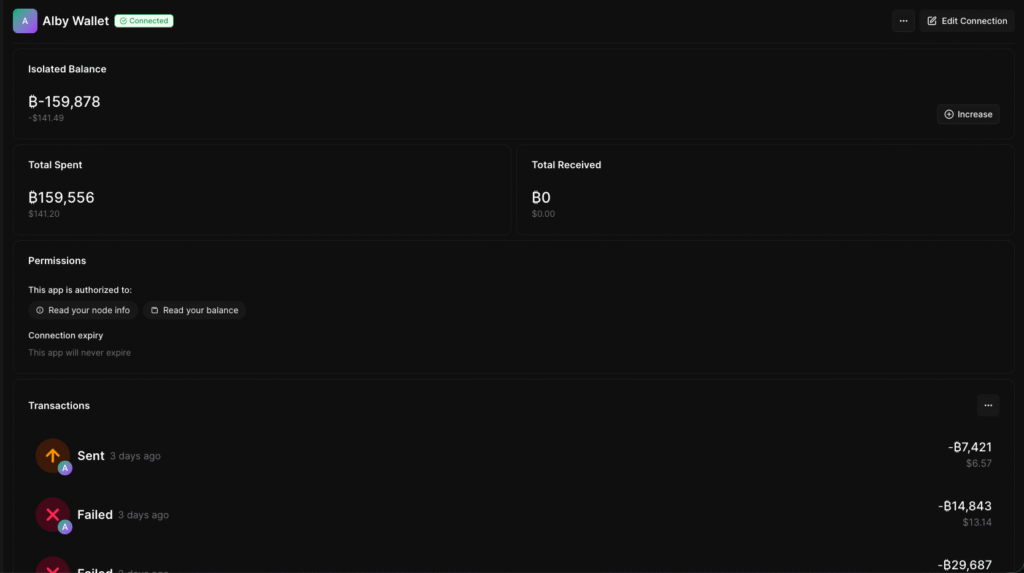
I had around 159,878 sats in the wallet at the time. I went to bed and woke up with 777 the next day, so yes, I am financially ruined.
Just when you thought I was going to make it out of the hood, the hood pulls me back in.
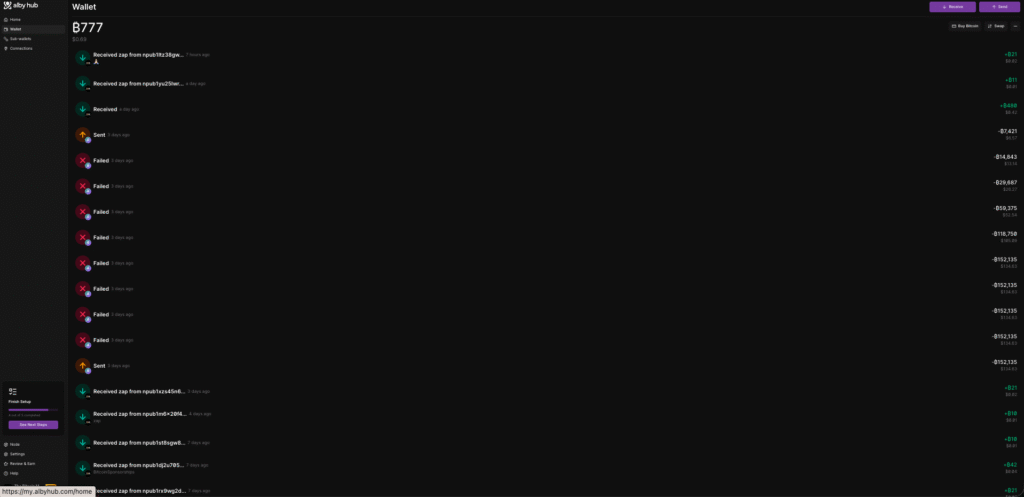
Upon further investigation, I noticed that the transactions in question were part of a Nostr wallet connection I made to another third-party app, but, being the lazy AI slop brain internet user that I am, I had forgotten to set any limitations on the connection.
I had established this app connection back in October of 2025 and had long since forgotten about it, but in short, I was basically trusting said application not do me dirty, and that’s not a good position to be in.
Since the application can read your total wallet balance, it can easily request the balance and have your wallet action it, since you’ve already given it permission to access the funds.
Now, is this a dumb feature? No, I just used it poorly; I chose poorly.
If I’m connecting with someone I know or trust, open access shouldn’t be the worst option.
In a perfect world, I could have been refunded, maybe even received some sort of service for those funds, but this is not a perfect world, so all I got for my Satoshis was a lesson in opsec and the feeling of being down moderately badly.
So now that you know my truth, my story, let’s help you nostr nerds, avoid the same pitfall.
- Step 1: Don’t be an idiot
- Step 2: Don’t trust, verify
- Step 3: Don’t let others profit
What Is Nostr Wallet Connect?
Traditionally, integrating Lightning payments into applications has been a nightmare for developers. Each Lightning wallet implements its own interface, requiring developers to code separate integrations for Wallet of Satoshi, Zeus, Blue Wallet, Alby, Phoenix, and dozens of others.
This creates massive friction:
- For developers: Building and maintaining 20+ wallet integrations is prohibitively expensive
- For niche wallets: Apps won’t build integrations for small user bases, limiting adoption
- For users: Forced to use specific wallets to access certain apps, fragmenting the ecosystem
NWC solves this by providing a unified, open protocol that works with any NWC-compatible wallet. Developers build one integration, users choose any compatible wallet, and payments flow seamlessly.
How NWC Works: The Technical Flow?
The NWC protocol enables sustained interaction between Lightning wallets and applications through Nostr relays:
Step 1: Connection Establishment
You scan a QR code, click a nostr+walletconnect: deeplink, or manually enter connection details. This one-time setup creates a cryptographic connection between your wallet and the app.
The connection string contains:
- Your wallet’s public key (for identification)
- A secret key for the app (for authentication)
- Relay information (where messages are exchanged)
- Permission scopes (what the app can do)
Step 2: Payment Request
When you want to make a payment in the app:
- The app creates a Lightning invoice
- The app sends a
pay_invoicerequest via Nostr relay - The request is encrypted using the connection keys
- Your wallet receives the request from the relay
Step 3: Authorisation and Payment
Here’s where the critical security distinction occurs:
- Manual approval mode: Your wallet displays the payment request and waits for your explicit confirmation. You review the amount, destination, and memo, then approve or reject.
- Auto-approval mode: Your wallet automatically pays the invoice without asking for confirmation, subject only to any budget limits you’ve configured.
Step 4: Confirmation
The wallet sends the payment, receives a preimage (proof of payment), and returns it to the app via the relay. The app confirms the payment succeeded and unlocks the content/service you purchased.
The Security Implications
The elegant simplicity of this flow obscures a critical fact: Once connected, an app can request payments at any time, and depending on your wallet’s configuration, those payments may be sent automatically without your knowledge or consent.
This is fundamentally different from traditional payment flows where:
- Credit cards require you to actively input card details
- Bank transfers require you to log in and confirm
- Even contactless payments require your physical card to be present
With NWC in auto-approval mode, a connected app can drain your wallet funds remotely, silently, and instantly—limited only by whatever budget restrictions you’ve configured (if any).
The Seven Critical Risks of Nostr Wallet Connect
Understanding the specific ways NWC connections can go wrong is essential for protecting yourself.
Risk 1: Compromised Applications
The most obvious risk: an application you’ve connected gets compromised by attackers.
The Attack Scenario:
- You connect a legitimate Nostr social media app to your wallet
- The app’s developer account gets hacked
- Attackers push a malicious update that requests maximum payments from all connected wallets
- If you have auto-approval enabled, your funds are instantly drained
- By the time you notice, the Bitcoin is gone and irreversible
Real-World Precedent:
This isn’t theoretical. The software supply chain attack pattern is well-documented:
- The Ledger Connect Kit was compromised in December 2023, draining ~$600,000 in minutes
- The event-stream NPM package was compromised to steal cryptocurrency
- Countless browser extensions have been bought by attackers and updated to steal funds
The attack surface for web apps is enormous: developer accounts, CI/CD pipelines, package dependencies, hosting infrastructure, DNS, and more. Any compromise can turn a trusted app into a wallet-draining weapon.
With NWC, a single compromised app with auto-approval permissions can drain your entire allocated balance before you even know you’ve been attacked.
Risk 2: Malicious Updates
Even without a hack, a legitimate app can turn malicious through intentional developer action.
The Scenario:
- You connect to a free Nostr app you’ve used for months without issues
- The developer decides to “exit scam” or gets desperate for money
- They push an update that silently requests maximum allowed payments from all connected wallets
- Your budget gets drained automatically if you have auto-approval enabled
- The developer disappears or claims it was a “bug”
The Problem:
Most users auto-update apps without reviewing changelogs. Even if you do review, malicious payment requests can be hidden in legitimate-looking code. And once the update is live, you have no recourse—the payments are sent, the Bitcoin is gone.
What makes this particularly dangerous: Many Nostr apps are developed by anonymous or pseudonymous developers. There’s no legal entity to pursue, no reputation to damage (they can simply create a new identity), and no recovery mechanism.
Risk 3: Lack of Transaction Transparency
A subtle but critical risk: you might not notice unauthorised payments until it’s too late.
The Visibility Problem:
When NWC operates in auto-approval mode, payments happen silently:
- No notification appears on your phone
- No confirmation dialogue interrupts you
- No email receipt arrives
- The only record is in your wallet’s transaction history, which you might check weekly or monthly
By the time you notice suspicious transactions, days or weeks have passed. The compromised app may have been removed from app stores, the developer vanished, and the Bitcoin already mixed or cashed out.
The Alibi Problem:
Even if you notice, proving the payments were unauthorised is difficult:
- You authorised the connection (you scanned the QR code)
- You configured the budget limits (or didn’t)
- The payments technically fell within your settings
- From the protocol’s perspective, everything worked correctly
This isn’t like a credit card, where you can dispute unauthorised charges. Bitcoin transactions are final, and you explicitly granted permission for the app to request payments.
Risk 4: Excessive Permissions and Budget Misconfigurations
Many users grant overly broad permissions without understanding the implications.
Common Misconfiguration Patterns:
- The “Unlimited Budget” Mistake: Setting no budget limit or an unrealistically high limit (10 million sats “just to be safe”) means a compromised app can drain everything in one request.
- The “High Per-Transaction Limit” Mistake: Setting a 100,000 sat per-transaction limit thinking it’s safe, but not realizing the app can make 100 requests in rapid succession, draining 10 million sats in seconds.
- The “Auto-Approve Everything” Mistake: Enabling auto-approval for convenience without understanding it means zero-click fund drainage.
- The “Never Reviewed My Connections” Mistake: Connecting apps months or years ago, forgetting they exist, never auditing which apps still have access to your wallet.
The Compounding Effect:
If you connect 5 apps, each with 100,000 sat budgets and auto-approval enabled, you now have 500,000 sats that can be drained without your knowledge across 5 different attack surfaces. Multiply this risk by every connection, and the exposure becomes massive.
Risk 5: Shared Balance Across Connections
Unless you specifically isolate each app with its own sub-wallet or balance, all your NWC connections potentially draw from the same Lightning wallet balance.
The Shared Pool Problem:
Imagine you have:
- 5 million sats in your Lightning wallet
- 10 apps connected via NWC
- Each app has 500,000 sat budget with auto-approval
From your perspective, you’ve allocated 5 million total (10 × 500k). But actually, all 10 connections can potentially access your entire 5 million sat balance simultaneously.
If one app gets compromised, it doesn’t just drain its 500k allocation—it drains as much as it can until the balance is empty, preventing legitimate payments from working on your other apps.
The Race Condition:
If multiple compromised apps attack simultaneously, they race to drain your wallet. The first to execute gets the funds. You lose everything, not just the per-app budget you thought you allocated.
Risk 6: Permission Scope Creep
NWC supports multiple permission scopes, and users often grant broad permissions without understanding what they enable.
Common NWC Permissions:
pay_invoice: App can request to pay Lightning invoicespay_keysend: App can send spontaneous payments without invoicesget_balance: App can check your wallet balanceget_info: App can retrieve wallet informationmake_invoice: App can create invoices for receiving paymentslookup_invoice: App can check invoice statuslist_transactions: App can see your transaction historymulti_pay_invoice: App can pay multiple invoices in one requestmulti_pay_keysend: App can send multiple keysend paymentssign_message: App can request message signatures with your wallet key
The Overgranting Problem:
Many apps request all permissions “just in case” they might need them in the future. Users, not understanding the implications, approve everything. This gives apps far more capability than necessary:
- An app that only needs to accept payments shouldn’t have
pay_invoicepermission - An app that sends payments shouldn’t need
list_transactionspermission (revealing your entire payment history) - Almost no app needs
multi_pay_invoiceormulti_pay_keysend, which enable rapid bulk drainage
Granting unnecessary permissions multiplies attack surface. A compromised app with only make_invoice permission can’t drain your funds. A compromised app with pay_invoice can.
Risk 7: The Nostr Identity Linkage Risk
A subtle privacy and security risk: NWC connections can link your Nostr identity to your Bitcoin payments.
The Linkage Problem:
NWC operates through Nostr’s cryptographic key infrastructure. If you use the same Nostr key for both:
- Your public Nostr profile (posts, social graph, identity)
- Your NWC wallet connections
Then any app you connect can:
- Link your public Nostr identity to your payment patterns
- See which other apps you use (by monitoring relay traffic)
- Build a profile of your spending habits
- Potentially deanonymize your Lightning payments
As one implementation guide explicitly warns: “If your wallet also offers any other Nostr functionality, like a user profile and already has a keypair for that, do NOT use that same keypair for the wallet service for Nostr Wallet Connect, since the apps you connect to will be able to link your payments with your Nostr identity.”
This linkage creates both privacy risks (deanonymization) and security risks (attackers can target individuals they know have large Bitcoin holdings based on their spending patterns).
The Critical Security Practices Every NWC User Must Follow
Given these risks, using NWC safely requires disciplined security hygiene. This isn’t optional advice—it’s the minimum necessary to avoid loss.
Practice 1: Always Verify Connection Details Before Scanning
Before scanning any NWC QR code or clicking any connection link, ask yourself:
- Do I trust this app’s developer? Anonymous devs carry higher risk than established companies with reputations to protect.
- Is this the official connection method? Phishing sites create fake connection QR codes that link to attacker-controlled wallets.
- What permissions is this app requesting? Check what the connection allows before approving.
- Do I really need this connection? The safest connection is one you never make.
The Verification Checklist:
- Access the app from the official URL/app store, never from links in messages or emails
- Verify the app’s Nostr public key matches official documentation
- Check what relays the connection uses (known, reputable relays are safer)
- Review requested permissions and reject any unnecessary scopes
- Search for “[app name] NWC security” to see if others have reported issues
Never blindly scan a QR code. Always verify you’re connecting to what you think you’re connecting to.
Practice 2: Set Strict Budget Limits on Every Connection
Budget limits are your first and most important line of defense. Without them, you’re one compromised app away from total loss.
The Recommended Budget Framework:
Per-Transaction Limit: The maximum a single payment request can be. Set this to the absolute maximum you’d ever expect to pay in one transaction:
- Social media zapping: 1,000-10,000 sats per transaction
- Content purchases: 10,000-50,000 sats per transaction
- Subscription apps: Match your subscription amount exactly
Daily/Monthly Budget: Total spending allowed across all transactions in a time period:
- Social apps: 10,000-50,000 sats per day
- Shopping apps: 100,000-500,000 sats per month
- Games: 50,000-100,000 sats per month
Total Connection Budget: Lifetime maximum that connection can spend before requiring renewal:
- Short-term trial apps: 10,000-50,000 sats total
- Established apps you trust: 100,000-1,000,000 sats total
- Never set “unlimited” or absurdly high limits “just in case”
The Conservative Default:
When in doubt, set budgets lower than you think you need. You can always increase them later. But if an app drains an excessive budget, you can’t get those sats back.
Monitor and Adjust: Review your budget usage weekly. If an app consistently hits its limits, evaluate whether the limit is too low or the app is requesting suspicious amounts.
Practice 3: Default to Manual Approval, Use Auto-Approve Sparingly
Auto-approval is convenient but catastrophically risky. The default for every new connection should be manual approval.
When Manual Approval Makes Sense:
- Any new app you’re trying for the first time
- Apps from developers you don’t deeply trust
- Apps that handle significant payment amounts
- Apps you use infrequently (daily or weekly rather than constantly)
- Any app where the slight friction of approval is acceptable
When Auto-Approval Might Be Acceptable:
- Apps from highly reputable developers (Alby, Amethyst, Damus from official sources)
- Apps you use constantly throughout the day (social media zapping)
- Very small budget limits (e.g., 1,000 sat max per transaction)
- Short expiration periods (connection expires in 1-7 days)
- Isolated balance (see Practice 4)
The Hybrid Approach:
Many wallets support hybrid modes:
- Auto-approve payments under 1,000 sats
- Require manual approval for anything above
- Limit auto-approval to specific times (e.g., only during hours you’re actively using the app)
This balances convenience with security, letting small zaps flow freely while protecting against large unauthorised drains.
Re-evaluate Regularly: Just because you enabled auto-approval three months ago doesn’t mean it’s still appropriate. As your usage patterns change, your approval settings should too.
Practice 4: Isolate Each App with Its Own Balance
The single most effective protection against shared-balance drainage: give each app access to a completely separate pool of funds.
Implementation Strategies:
Separate Lightning Wallets: Run multiple Lightning wallets, each dedicated to specific apps:
- One wallet for social media apps
- One for content/subscription apps
- One for games and experimental apps
- One for high-value purchases
If one wallet gets compromised, the others remain safe.
Sub-Accounts/Sub-Wallets: Many wallets support creating multiple accounts or sub-wallets within a single Lightning node:
- Alby allows multiple “connections” with separate balances
- Zeus supports multiple accounts on the same node
- Phoenix enables creating child wallets
Allocate specific balances to each, so apps only access their designated funds.
- Channel-Level Isolation: For advanced users running their own nodes, you can dedicate specific Lightning channels to specific apps, providing hardware-level balance separation.
- Top-Up Model: Maintain very small balances in each isolated wallet (10,000-50,000 sats), topping up only when needed. This limits exposure—even total compromise only risks the small balance.
- The Trade-Off:Isolation reduces convenience (managing multiple wallets is more complex) but dramatically reduces risk. For significant holdings or untrusted apps, the trade-off is worthwhile.
Practice 5: Regularly Audit and Revoke Connections
NWC connections don’t expire automatically in most implementations. An app you connected two years ago and forgot about still has access to request payments.
The Audit Schedule:
- Weekly: Review active connections in your wallet settings. Verify each is still necessary and usage matches expectations.
- Monthly: Revoke any connections you haven’t used in 30+ days. If you need the app again, reconnecting takes 30 seconds—the security gain is worth the minor inconvenience.
- After Any Suspicious Activity: If you notice unexpected payments or your wallet behaves strangely, immediately revoke all connections and investigate.
- Before Significant Balance Increases: If you’re about to deposit substantial sats into your Lightning wallet, first audit and revoke all non-essential connections to minimise attack surface.
The Revocation Checklist:
For each connection, ask:
- When did I last use this app? (If >30 days, consider revoking)
- Do I still trust this app’s developer? (If uncertain, revoke)
- Has this app been updated recently? (Check if update introduced vulnerabilities)
- Is the budget limit still appropriate? (Usage patterns change over time)
- Does the app still exist? (Abandoned apps can be bought by attackers)
Document Your Connections: Maintain a simple spreadsheet tracking:
- App name and purpose
- Connection date
- Budget limits set
- Last used date
- Developer/company name
This makes audits faster and helps you spot patterns (e.g., you’ve connected 20 apps but only actively use 3).
Practice 6: Never Grant Permissions You Don’t Understand
Default to denying any permission you don’t have a clear, specific reason to grant.
The Permission Review Process:
Before approving a connection, check what permissions are requested:
pay_invoice: Only if the app needs to send payments (most do)make_invoice: Only if the app receives payments on your behalfget_balance: Does the app really need to see your balance? Often nolist_transactions: Almost never necessary—this reveals your entire payment historymulti_pay_*: Extremely dangerous, only for bulk payment apps you deeply trustsign_message: Rarely needed, enables identity proofs that may link payments to identity
The Minimal Permission Principle:
Ask yourself: “What is the absolute minimum this app needs to function?” Grant only that.
If an app demands excessive permissions, either:
- Find an alternative app with more reasonable permission requests
- Contact the developer and ask why they need broad permissions
- Simply don’t use the app—your security is more important
Practice 7: Set Connection Expiration Dates
Time-limited connections automatically revoke access after a period, forcing you to periodically re-evaluate whether you still trust the app.
Recommended Expiration Periods:
- New/untrusted apps: 7 days (one-week trial)
- Experimental apps: 30 days (monthly review)
- Trusted apps you use regularly: 90 days (quarterly review)
- Highly trusted, frequently used apps: 365 days (annual review)
The Benefits:
- Forced re-evaluation: You must consciously decide to renew, preventing forgotten connections
- Automatic cleanup: Abandoned apps automatically lose access
- Compromise window limitation: Even if compromised, access expires automatically
- Motivation to audit: You’re reminded to review the connection when renewal is required
Implementation:
Not all wallets support automatic expiration, but you can manually implement this:
- Set calendar reminders to review connections
- Label connections with expiration dates in your audit spreadsheet
- Proactively revoke and re-create connections on a schedule
Practice 8: Monitor Your Transaction History Obsessively
If unauthorised payments do occur, catching them quickly limits damage.
The Monitoring Routine:
Daily Check: Quick glance at today’s transactions to spot any unexpected payments
Weekly Review: Detailed review of the past week’s transactions:
- Verify each payment matches an action you took
- Check amounts match what you authorized
- Investigate any unrecognised recipient pubkeys or descriptions
Monthly Reconciliation: Comprehensive audit comparing:
- Total spent vs. expected spending
- Per-app spending vs. app budgets
- Transaction counts vs. your activity level
Set Up Alerts: Many wallets support alerts for:
- Payments above certain thresholds
- Payments during specific hours (late-night transactions may indicate compromise)
- Rapid successive payments (suspicious pattern)
- Balance dropping below a minimum
The Deviation Response:
If you notice anything suspicious:
- Immediately revoke all NWC connections
- Document the suspicious transactions (screenshots, transaction IDs, timestamps)
- Investigate which app made the payment (check relay messages if possible)
- Withdraw remaining balance to a secure wallet with no NWC connections
- Report the issue to the app developer and wallet provider
- Warn the community (post on Nostr, Reddit, Twitter about the compromised app)
Real-World Scenario: How a Compromise Actually Unfolds
Now that we’ve gone through the theoretical risks.
Let’s take a real-world situation and see how an actual attack might unfold to make the danger visceral.
Note: I am not calling out ZapStream in any way; this is just an example, so relax!
Day 1 – The Connection: You discover a cool new Nostr app called “ZapStream” for video streaming. It requires NWC to unlock premium content. You scan the QR code, approve the connection with:
- 100,000 sat per-transaction limit
- 1 million sat monthly budget
- Auto-approval enabled (you don’t want to manually approve every video)
- Access to your main wallet with 5 million sats
Day 30 – You Get Hooked: ZapStream works great. You’ve watched 50 hours of content, spent 200,000 sats total, and love the service. You’ve completely forgotten about the NWC connection—it just works.
Day 45 – The Compromise: ZapStream’s AWS account gets compromised through a phishing attack on the developer. Attackers deploy modified code that requests maximum payments from all connected wallets.
Day 45, 3:00 AM: While you sleep, the compromised app begins making payment requests:
- Request 1: 100,000 sats – Auto-approved, sent instantly
- Request 2: 100,000 sats – Auto-approved, sent instantly
- Request 3: 100,000 sats – Auto-approved, sent instantly
- [Continues every 5 seconds…]
- Request 50: 100,000 sats – Auto-approved, sent instantly
In 4 minutes, your entire 5 million sat wallet is drained through 50 rapid-fire payment requests, each within your per-transaction limit.
Day 45, 8:00 AM: You wake up and check your phone. Opening your wallet, you see the balance: 0 sats. Checking transaction history shows 50 payments to unknown recipients between 3:00-3:04 AM, all approved by your ZapStream connection.
Day 45, 8:05 AM: You frantically revoke the connection and check ZapStream’s status. Their website is down. Their Nostr account’s last post is from yesterday. You search Twitter and Reddit—dozens of users reporting the same thing. Total losses exceed 100 million sats.
Day 45, 9:00 AM: The developer posts that their AWS account was compromised. They’re “investigating” and promise to “make things right.” But Bitcoin transactions are irreversible. Your 5 million sats are gone forever.
Day 46 – The Aftermath: The developer posts an apology but takes no responsibility—”users should have set appropriate budget limits.” The attackers have already mixed the funds through a dozen hops and cashed out. You have no recourse, no insurance, no way to recover your loss.
The Lesson: Every element has happened in real attacks on other platforms. The only variable is which app gets compromised and when.
When NWC Is Actually Safe to Use
Despite the risks, NWC isn’t inherently dangerous—it’s a powerful tool that requires discipline and proper configuration.
NWC Is Reasonably Safe When:
- You connect only to apps from highly reputable developers with established track records and real-world identities
- You set strict budget limits (per-transaction, daily, monthly, and total)
- You use manual approval for all but the smallest transactions
- You isolate each app with its own balance separate from your main funds
- You regularly audit and revoke connections (at least monthly)
- You only grant necessary permissions and understand what each enables
- You monitor transaction history and investigate any anomalies immediately
- You set expiration dates on connections and periodically renew
NWC Is Dangerously Risky When:
- You connect to apps from unknown or anonymous developers
- You set unlimited or excessively high budgets
- You enable auto-approval for large amounts
- All your apps share access to your main wallet balance
- You never audit or revoke connections
- You grant all requested permissions without review
- You rarely check transaction history
- Connections never expire and are never re-evaluated
The Risk-Tolerance Question:
Ultimately, using NWC requires honest assessment of your risk tolerance:
- If losing 100,000 sats would be devastating, NWC with auto-approval is too risky
- If losing 100,000 sats would be annoying but acceptable, NWC with proper safeguards is reasonable
- If losing 1 million sats would be catastrophic, don’t use NWC at all—or use only manual approval with tiny balances
Your risk tolerance should dictate your NWC configuration, not your desire for convenience.
The Fundamental Trade-Off: Convenience vs. Security
NWC exemplifies the eternal tension in Bitcoin: convenience always trades off against security.
Maximum Convenience, Minimum Security:
- Connect all apps to one wallet
- Grant all requested permissions
- Enable auto-approval for all amounts
- Never audit or revoke connections
- Set unlimited budgets
This configuration makes payments effortless, but is a catastrophe waiting to happen. One compromise and everything is gone.
Maximum Security, Minimum Convenience:
- Connect no apps (use manual Lightning payments for everything)
- Or connect only to one or two highly trusted apps
- Grant only essential permissions
- Require manual approval for every payment
- Isolate each app with tiny balances
- Revoke and re-create connections weekly
This configuration is extremely safe but negates most of NWC’s user experience benefits.
The Balanced Middle Ground:
- Connect only trusted apps (5-10 maximum)
- Set strict but reasonable budget limits
- Use auto-approval for very small amounts, manual for anything significant
- Isolate apps with moderate dedicated balances
- Audit monthly, revoke unused connections
- Set quarterly expiration on connections
This balanced approach provides most of NWC’s convenience while maintaining acceptable risk.
The Key Insight: There is no “right” answer. What’s appropriate depends entirely on your financial situation, risk tolerance, and usage patterns. But whatever you choose, choose consciously, understand the trade-offs, and implement the safeguards appropriate to your choice.
Convenience Is Not Worth Your Bitcoin
Nostr Wallet Connect is a powerful innovation that makes Lightning payments dramatically more accessible and user-friendly. The ability to seamlessly zap content creators, pay for services, and interact with apps using your own Lightning wallet—all through simple NWC connections—is genuinely transformative.
But this convenience comes at a price: every NWC connection is a potential attack vector. Every app you connect is another trust assumption. Every permission you grant is another capability that could be abused. Every second you leave a connection active is another second of exposure.
The protocol’s design acknowledges these risks by allowing budget limits, spending controls, approval requirements, and permission scoping. But the protocol can’t force you to use these protections. The responsibility falls entirely on you.
The uncomfortable truth: Most users won’t follow the security practices outlined in this post. They’ll connect apps impulsively, grant excessive permissions, enable auto-approval for convenience, and never audit their connections. And most of them will be fine—until they’re not.
Then, one day, they’ll wake up to a drained wallet, stolen funds, and zero recourse. And they’ll learn the hard way that convenience is not worth your Bitcoin.
Don’t be that person. Treat every NWC connection as the serious security decision it is. Verify before connecting. Limit budgets strictly. Default to manual approval. Isolate balances. Audit regularly. Revoke aggressively.
Your Lightning wallet isn’t just a convenient payment app—it’s a bearer instrument containing real value. Protect it like you would protect cash in your physical wallet. Because once the sats are gone, they’re gone forever.
The question isn’t whether NWC is safe. The question is whether you will use it safely. The protocol provides the tools. Your discipline determines the outcome.
Choose wisely. Your Bitcoin depends on it.