Hardware wallets have come under a lot of scrutiny over the last year, and rightly so; what was once seen as the gold standard for storing digital gold has been shown to be less than stellar.
The COLDCARD hack has shaken faith in self-custody and Ledger’s Recovery service, and the LEDGER and TREZOR leak of customer order data has exposed users to possible threats such as wrench attacks; it’s been a tough time for manufacturers and resellers in the space.
And just when you thought it was safe to buy a hardware wallet and run a single-signature setup, we found out supply chain attacks could be hidden in plain sight, after news broke that LEDGER resellers in Asia had been selling compromised devices.
So should we give up on purchasing a standalone device for self-custody?
Honestly, no!
I wouldn’t throw the baby out with the bathwater just yet!
The threats are real now, and we can see how much it can cost you, so moving to a multi-vendor, multi-signature setup for self-custody seems like your best bet.
Or you can generate your seed phrases with your own randomness and not trust any device to do it for you.
As you can tell, hardware signing device manufacturers have an uphill climb from 2026 onwards to earn back user trust and show that they can be used by the average person for self-custody, and this can only be achieved through active competition.
The more vendors we have, the more they keep one another on their toes and give us options for managing a multi-vendor setup.
ERA Hardware Wallet (Bitcoin-Only Perspective)
The ERA Hardware Wallet enters an increasingly crowded market of cryptocurrency signing devices, promising a blend of modern touch-based usability, air-gapped security, and innovative physical entropy generation.
While marketed broadly across the digital asset ecosystem, its appeal to Bitcoin maximalists and cold-storage purists hinges entirely on its technical architecture, firmware isolation capabilities, and adherence to foundational cryptographic self-custody principles.
At its core, the ERA Hardware Wallet offers three distinct value propositions that demand rigorous critical analysis: a dedicated, flashable Bitcoin-only firmware mode; multi-wallet profile management capable of storing up to 10 isolated cryptographic seeds on a single physical unit; and a multi-vector entropy generation engine (“Expert Mode”) that leverages integrated hardware sensors—including a touch panel, accelerometer, and optical camera—to supplement baseline random number generation.
The purpose of this review is to cut through promotional marketing fluff and conduct an unvarnished, objective evaluation of the ERA Hardware Wallet specifically tailored for Bitcoin-only users.
We assess whether its custom hardware features enhance real-world operational security (OpSec) or introduce unnecessary attack vectors, evaluate its firmware security posture, scrutinise its entropy engine against physical randomness benchmarks, and determine whether it deserves a place in a sovereign Bitcoiner’s security stack.
Firmware Architecture: Bitcoin-Only vs. Standard Modes
In modern hardware security design, code complexity is the enemy of security. Multi-currency hardware wallets are inherently burdened with massive codebases required to support diverse cryptographic curves (e.g., ed25519, secp256k1, sr25519), Ethereum Virtual Machine (EVM) state parsing, smart contract ABI decoding, and complex third-party token standards. Every additional line of code, external dependency, and parsing library increases the surface area for software vulnerabilities, remote execution exploits, and firmware bugs.
ERA addresses this systemic vulnerability by providing a dedicated Bitcoin-only firmware image. When flashed with Bitcoin-only firmware, the device completely strips away all altcoin cryptographic routines, token-parsing smart contract libraries, and non-essential network protocol handling.
This reduction in binaries yields several distinct security advantages:
- Drastically Reduced Attack Surface: By removing EVM parsers and altcoin transaction logic, vector paths for malicious payload injection via crafted transaction data are virtually eliminated.
- Simplified Security Auditing: A minimal codebase allows independent security researchers and open-source contributors to audit the entire firmware stack line-by-line, verifying that no backdoors or unintended state leaks exist.
- Deterministic Compilation & Verification: A streamlined Bitcoin codebase makes reproducible builds significantly easier to verify, ensuring that the binary running on the physical microcontroller matches the published open-source repository verbatim.
For Bitcoin purists, running standard multi-currency firmware on a cold-storage device represents an unacceptable trade-off. ERA’s Bitcoin-only firmware mode puts it in direct competition with dedicated Bitcoin signers like the COLDCARD, Blockstream Jade, and BitBox02 Bitcoin-only edition.
However, users must ensure they actively flash the Bitcoin-only binary upon unboxing, as units may ship by default with standard multi-asset firmware.
Entropy Generation: Standard Mode vs. Expert Mode vs. External Dice Rolls
The cryptographic integrity of a Bitcoin wallet is entirely dependent on the quality of initial key creation. A seed generated with predictable or flawed entropy can lead to complete, irreversible loss of funds via mathematical recovery attacks. ERA offers two built-in entropy generation modes, which must be critically weighed against sovereign offline generation methods.
Standard Entropy Mode
In Standard Mode, the device relies on its internal Hardware True Random Number Generator (TRNG) chip combined with internal software pseudo-random number generators (PRNG). While standard across consumer electronics, sole reliance on internal hardware TRNGs introduces potential single-point-of-failure vulnerabilities.
Historically, microcontrollers and security elements have suffered from manufacturer hardware backdoors, flawed physical RNG implementations, or reduced thermal noise states that compromise mathematical randomness without the user’s knowledge.
Expert Entropy Mode
To mitigate reliance on internal TRNG hardware, ERA introduced “Expert Mode,” which allows users to mix three physical input vectors directly into the entropy pool prior to seed derivation:
- 1. Touchscreen Gesture Tracking: Capturing micro-variations in touch coordinates, swipe speed, pressure, and gesture timing on the capacitive display.
- 2. Accelerometer-Based Motion Sensing: Sampling physical device shaking, tilt angles, and rotational velocity using the built-in 3-axis motion sensor.
- 3. Optical Camera Snapshot Capture: Panning the optical camera around a room or taking a snapshot of a complex visual environment to extract raw pixel data and noise profiles into the hash function. So you could take a picture of your wife or girlfriend while you ask her what she wants to eat for supper, and that should provide more than enough entropy.
Critical Security Analysis: Innovation vs. Novelty
While Expert Mode provides a visually engaging experience and adds layers of user-contributed randomness over standard TRNG outputs, a critical security analysis reveals fundamental caveats.
Software processing of high-dimensional sensor data (such as digital camera image buffers or accelerometer streams) requires post-processing hashing algorithms (e.g., SHA-256) to flatten data into 256 bits of uniform entropy.
If the software implementation processing camera data contains mathematical bias, compression artifacts, or unhashed sensor buffers, the resulting entropy pool may not be as uniform as theoretical models suggest.
Furthermore, integrated camera sensors and touch controllers introduce complex hardware drivers into the secure execution environment, expanding software complexity.
This means these entropy methods may not work as advertised and could be security theatre.
For high-assurance cold storage securing significant capital, relying on physical sensor inputs inside consumer hardware remains inferior to verifiable, externally generated physical entropy.
The Sovereign Gold Standard: External Physical Dice Rolls
For true self-sovereign Bitcoiners, the recommended operational workflow is to bypass ERA’s internal seed generation mechanisms altogether—both Standard and Expert modes.
Instead, users should perform physical dice rolls using high-quality casino-grade dice, manually calculate the entropy (or utilise open-source, air-gapped calculation tools like Coldcard or Ian Coleman’s offline BIP-39 tool), verify the 24-word mnemonic checksum manually, and import the resulting seed phrase into the ERA hardware unit.
Importing pre-computed, verified entropy guarantees zero reliance on ERA’s onboard sensors, internal TRNG chips, or hashing drivers.
Multi-Wallet Profile Management (Up to 10 Wallets)
A distinguishing feature of the ERA Hardware Wallet is its native support for storing and isolating up to 10 distinct wallet seed profiles concurrently on a single device. Each profile operates under its own distinct seed phrase, derivation paths, and security configurations, protected by independent authentication PINs.
Operational Use Cases & Benefits
- Granular Asset Segregation: Users can maintain an isolated primary cold storage wallet, a medium-value daily spending/lightning funding wallet, a dedicated Testnet profile, and individual signing keys for multisig setups without needing multiple physical hardware devices.
- Deterrence via Duress Profiles: Multiple PIN profiles allow for plausible deniability setups where unlocking a secondary PIN reveals a low-balance “decoy” wallet while keeping high-value vault profiles cryptographically hidden.
OpSec Vulnerabilities & Risks
From a strict physical attack and threat-modelling perspective, consolidating up to 10 independent cryptographic key sets onto a single physical hardware unit introduces substantial risks:
- Single Point of Physical Failure: If the ERA hardware unit experiences physical destruction, liquid damage, battery swelling, or secure element lockout, all 10 distinct wallet instances become inaccessible simultaneously until every individual 24-word seed backup is manually restored across separate devices.
- Increased Cognitive Load & PIN Confusion: Managing up to 10 separate access PINs significantly raises the probability of user error, accidental PIN lockouts, or mistaking a decoy profile for a primary vault profile during high-stress transactions.
- Coercion Vectors: In a targeted physical attack ($5 wrench attack), sophisticated adversaries aware of multi-profile capabilities may force physical access to all stored slots, undermining the practical efficacy of simple duress PINs.
Hardware Form Factor, Air-Gap Workflow & Usability
The ERA Hardware Wallet relies heavily on a fully air-gapped physical operational model. The device purposefully lacks wireless communication chips (such as Bluetooth, Wi-Fi, or Cellular modems) and restricts its physical USB interface purely to power delivery and battery charging, preventing wired data exfiltration or badUSB injection vectors.
Air-Gapped Optical QR Code Workflow
Transaction signing relies entirely on optical communication via two-way QR code scanning between the ERA device camera/screen and a desktop or mobile coordinator wallet (such as Sparrow Wallet, Electrum, or BlueWallet):
- 1. PSBT Generation: The software watch-only wallet creates a Partially Signed Bitcoin Transaction (PSBT) and displays it as a dynamic, animated sequence of QR codes.
- 2. PSBT Ingestion & Verification: The user captures the dynamic QR stream using ERA’s integrated camera sensor. The device decodes the PSBT in isolated memory, displaying the transaction details (recipient addresses, output amounts, miner fees, and change outputs) on its touch screen.
- 3. Cryptographic Signing: Upon physical user confirmation, ERA signs the inputs offline using the targeted profile’s private keys.
- 4. Signed Transaction Broadcast: ERA outputs the finalised PSBT as a dynamic QR code on its display screen, which is read back by the watch-only coordinator software for network broadcast.
The optical air-gap implementation on ERA is smooth and responsive. The high-resolution screen rendering allows high-density QR transmission, while the optical camera sensor quickly registers dynamic PSBTs without tedious alignment lag. This air-gapped setup provides complete physical isolation from host malware, keyloggers, and infected USB buses.
Physical Hardware Build & Components
While the capacitive touch screen improves usability when verifying long addresses and PSBT parameters compared to dual-button hardware interfaces, it introduces durability considerations. Glass/plastic touch panels, integrated lithium-ion batteries, and optical camera modules introduce physical fragility.
Over multi-year time horizons, battery degradation or display failure could render the signing interface unusable, highlighting the necessity of maintained steel seed phrase backups.
6. Critical Pros and Cons for Bitcoiners
Pros
- Dedicated Bitcoin-Only Firmware: Completely strips out altcoin, EVM, and smart-contract codebases, drastically reducing attack surface and simplifying security audits.
- True Optical Air-Gap Workflow: Strict QR code interaction eliminates USB data connections, Bluetooth vulnerabilities, and malicious host computer exploits.
- Multi-Wallet Segregation: Ability to store up to 10 isolated seed profiles on a single device, enabling flexible setup of cold vaults, hot spenders, and multisig keys.
- Multi-Vector Physical Entropy Input: Expert Mode provides innovative physical user entropy mixing (touch, motion, camera) beyond basic onboard hardware TRNG chips.
- Ergonomic Interface: Large touch display makes full PSBT parsing, fee checking, and target address confirmation intuitive and reliable.
Cons
- Software-Processed Entropy Limits: Built-in sensor entropy generation, even in Expert Mode, relies on complex internal driver software and cannot replace audited, verifiable offline dice rolls.
- Increased Hardware Vulnerability: Touchscreen panels, camera sensors, accelerometers, and rechargeable batteries introduce multiple hardware degradation and failure points.
- Single Point of Failure for Multi-Profiles: Storing 10 wallet instances on one physical device concentrates physical theft, loss, and destruction risks.
- Higher Price Point: Premium sensor integration and form factor drive up costs compared to minimalist, basic-display Bitcoin signers.
Is ERA Wallet Open Source?
ERA Wallet’s stack is not completely open source; the companion app is fully open source, while its device firmware and bootloader are only partially open source due to pending patent applications.
You can inspect their published code directly on the ERA Wallet GitHub, where the stack is divided into the following levels of transparency:
- Companion App (Fully Open Source). The mobile application used for QR communication and device verification is completely open source.
- Main Firmware (ERA-Firmware – Partially Open Source). This repository contains the UI, wallet generation, transaction signing, and key handling logic. While the code is available for public review, certain proprietary modules remain private.
- Bootloader (ERA-Bootloader – Partially Open Source). Based on MCUBoot, this component verifies and updates the main firmware. Like the main firmware, parts of it remain closed.
- Open Standards. Rather than relying on proprietary bridges, the device uses the open EIP-4527 standard for air-gapped QR code communication, allowing it to connect with any compatible third-party software wallet (such as MetaMask, Rabby, or OKX).
The Setup
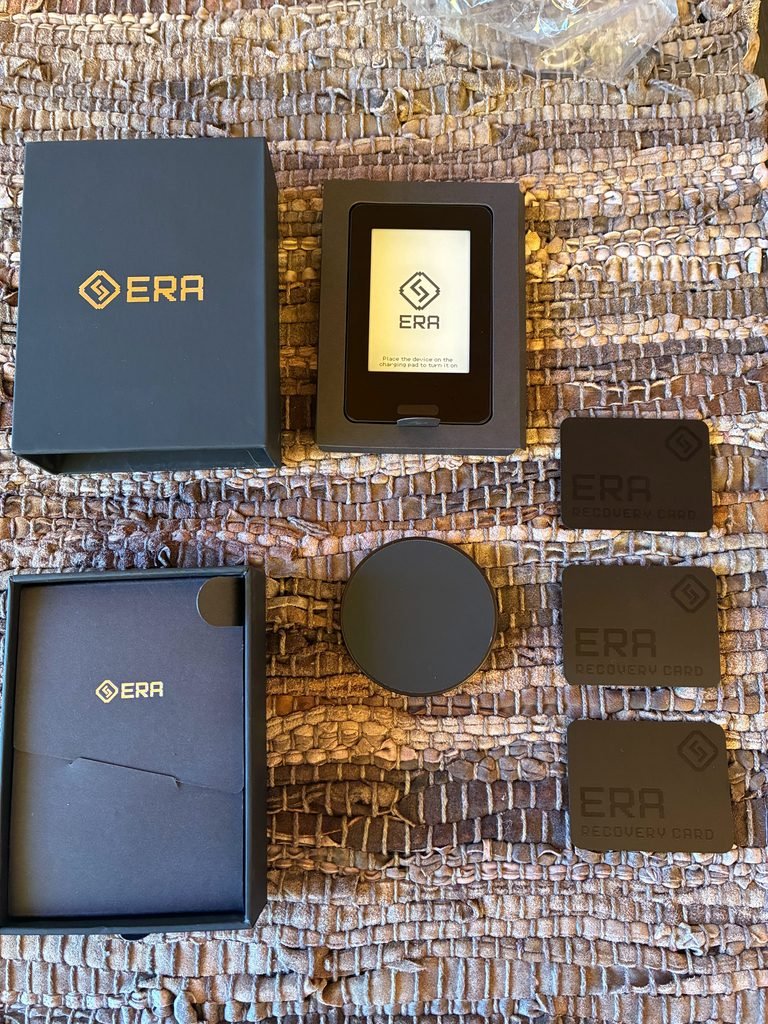
When you purchase an ERA wallet, you’ll find the following in the box
- The ERA Wallet
- A Wireless Charging Pad
- Encrypted NFC Recovery Card
- Instructions
The wallet does have a large touch screen, which is easy to use and see what’s going on, which will come in handy as Bitcoiners get older; our eyesight won’t be as good as it was when we first set up wallets on tiny Jade, Seedsigner or Trezor screens without the need to squint.
Step-by-Step Setup Guide
- Unbox and Inspect Package Contents: Verify that your box contains the ERA Wallet, Wireless Charging Pad, Encrypted NFC Recovery Card, and Instructions.
- Charge your device: Have your own USB-C cable handy to connect to the charging pad, then place the ERA Wallet on the pad to start charging. Give it a few minutes, then press the only physical button on the device to turn it on.
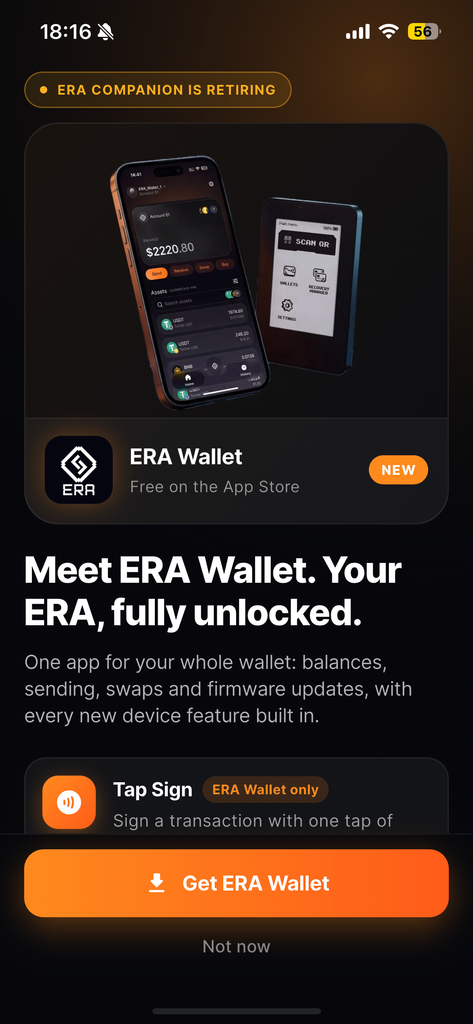
- Download the companion app: Since the device has no method of internet connection or physical ports, you will need the companion app on your phone to proceed. You can download it from the App Store or use the QR code displayed on the device once you boot it up; pick Apple or Android, and the QR code will redirect you accordingly.
- Flash Bitcoin-Only Firmware Immediately: Before creating any wallet or seed phrase, connect the device to your computer via USB/air-gap flash protocol and install the official Bitcoin-only firmware binary to strip altcoin dependencies and minimise the attack surface. Use the companion app to select the binary you want, then place your phone over the device to transfer the binary and the latest firmware. Once the firmware is updated and your choice of binary (multi-asset or Bitcoin only) has been installed, you can move on to the setup phase.
- Verify Device and Companion app: Once set up, scan two QR codes: one on the device to confirm the device is authentic, and one in the companion app to verify you’re using the correct app and not a look-alike listed on the app store. To me, this is possibly the biggest weakness of the device, and you’re trading the possibility that your PC is corrupt for hoping the App Store doesn’t pass on a fake version of the app that can bypass these checks. (Note: There have been several cases of fake wallets listed on App stores)
- Generate a wallet: You will be presented with two modes, standard and expert. If you pick standard, the device will generate the keys for you based on device-only entropy. If you select expert, you will be tasked with providing an additional three forms of entropy before the wallet is generated.
- Save your seed phrase: After the wallet generates your seed phrase, you can store it on one of the 3 NFC recovery cards provided, or write it down. I appreciate the UI for beginners, which helps you run through and verify that you wrote down your seed correctly and in the correct order. I recommend using both methods, since it makes recovery harder if the device dies or is damaged. You would require a new device to read off your recovery card.
Alternatively
- Mnemonic Seed via External Physical Dice Rolls: Bypass internal TRNG and sensor entropy modes. Roll casino-grade dice manually, compute the 24-word BIP-39 mnemonic phrase using air-gapped software or manual calculations, and verify the checksum.
- Import Seed & Configure BIP-39 Passphrase: Import your 24-word seed phrase into the ERA Wallet and assign a strong, memorable BIP-39 passphrase (the 25th word) to create a hidden, secure wallet profile protected against physical extraction attacks.
Once your wallet or wallets are generated
ERA wallet is compatible with several Bitcoin wallets, namely:
- BlueWallet
- Nunchuk
- Sparrow Wallet
Pair with a Sovereign Watch-Only Coordinator: Export your wallet’s account public key (xpub/zpub) via dynamic QR code to a sovereign watch-only coordinator software (such as Sparrow Wallet connected to your full node) to complete your air-gapped setup.
The air-gapped nature of the wallet does make it a bit clunky to create addresses and sign transactions, but it can save many a novice from themselves, since the user experience makes it hard to connect your device to a compromised computer or internet connection.
Note on recovery cards:
You can use the recovery cards in a multitude of ways
- Either store your seed phrase on one card
- Split your seed across multiple Recovery Cards with a custom threshold using Shamir Secret Sharing. Depending on your threshold, you can lose one and still recover your seed, but lose them all— and it’s mathematically impossible to reconstruct. Hence my recommendation to always write down your seed phrases and store them in something more robust than paper.
- Alternatively, you can create a multi-sig with three different seeds and store each seed on a single recovery card.
Final Verdict & Operational Recommendations
The ERA Hardware Wallet is a highly capable signing device that offers robust protection when configured correctly for a Bitcoin-centric threat model. Its Bitcoin-only firmware option, coupled with a seamless optical QR air-gap interface, makes it a powerful contender for cold-storage management and multisig quorum key storage. However, users must avoid over-reliance on its complex internal hardware sensors for entropy generation and maintain strict operational procedures.
Hardened Security Setup Guide for Bitcoiners
- 1. Flash Bitcoin-Only Firmware Immediately: Before setting up any seed phrase, verify and flash the official Bitcoin-only firmware binary to strip out all altcoin libraries.
- 2. Use External Physical Dice Rolls for Key Generation: Do not rely exclusively on Standard TRNG or Expert sensor entropy. Generate entropy manually using physical dice rolls, calculate your BIP-39 mnemonic phrase offline, and import it into the ERA device.
- 3. Enforce Strong BIP-39 Passphrases: Apply a robust, memorable passphrase (an optional “25th word”) to key vault profiles to secure funds against physical hardware extraction attacks.
- 4. Limit Active Profiles: Avoid storing 10 separate high-value wallets on a single device unless necessary. Keep high-value cold vault profiles separate from high-frequency testing profiles to lower cognitive overhead and physical exposure.
- 5. Pair with Sovereign Watch-Only Coordinators: Use ERA exclusively with trusted open-source coordinator software (such as Sparrow Wallet connected to your own Electrum Server or Bitcoin Full Node) over optical QR codes.
Purchase An ERA Wallet
If you decide to purchase the ERA Hardware Wallet, you can support our independent testing via the affiliate link below, or choose the non-affiliate option:
- Get 10% Off (Affiliate Link): https://era-wallet.com/products?ref=tbm
- Non-Affiliate Link: https://era-wallet.com/